Notion AI vs ChatGPT: Which Productivity Tool Is Better?
Notion AI vs ChatGPT: Which Productivity Tool Is Better?
Two tools dominate the conversation when professionals talk about AI-powered productivity: Notion AI and ChatGPT. Both are genuinely useful. Both are widely adopted. And both are frequently misunderstood in terms of what they actually do well and where they fall short.
The comparison matters because choosing the wrong tool for your workflow does not just cost you money. It costs you the time and momentum you lose adapting to a tool that was never built for your specific use case.
This guide gives you a direct, honest comparison of Notion AI versus ChatGPT across every dimension that matters for professional productivity, and tells you clearly which tool wins in each context and why.
Understanding What Each Tool Is Actually Built For
Before comparing features, it is essential to understand the fundamental design philosophy behind each tool, because they are solving different problems at their core.
ChatGPT is a conversational AI assistant. It is built to respond to questions, generate content, analyze information, write code, brainstorm ideas, and solve problems through a back-and-forth dialogue interface. It is a general-purpose intelligence tool that you bring tasks to.
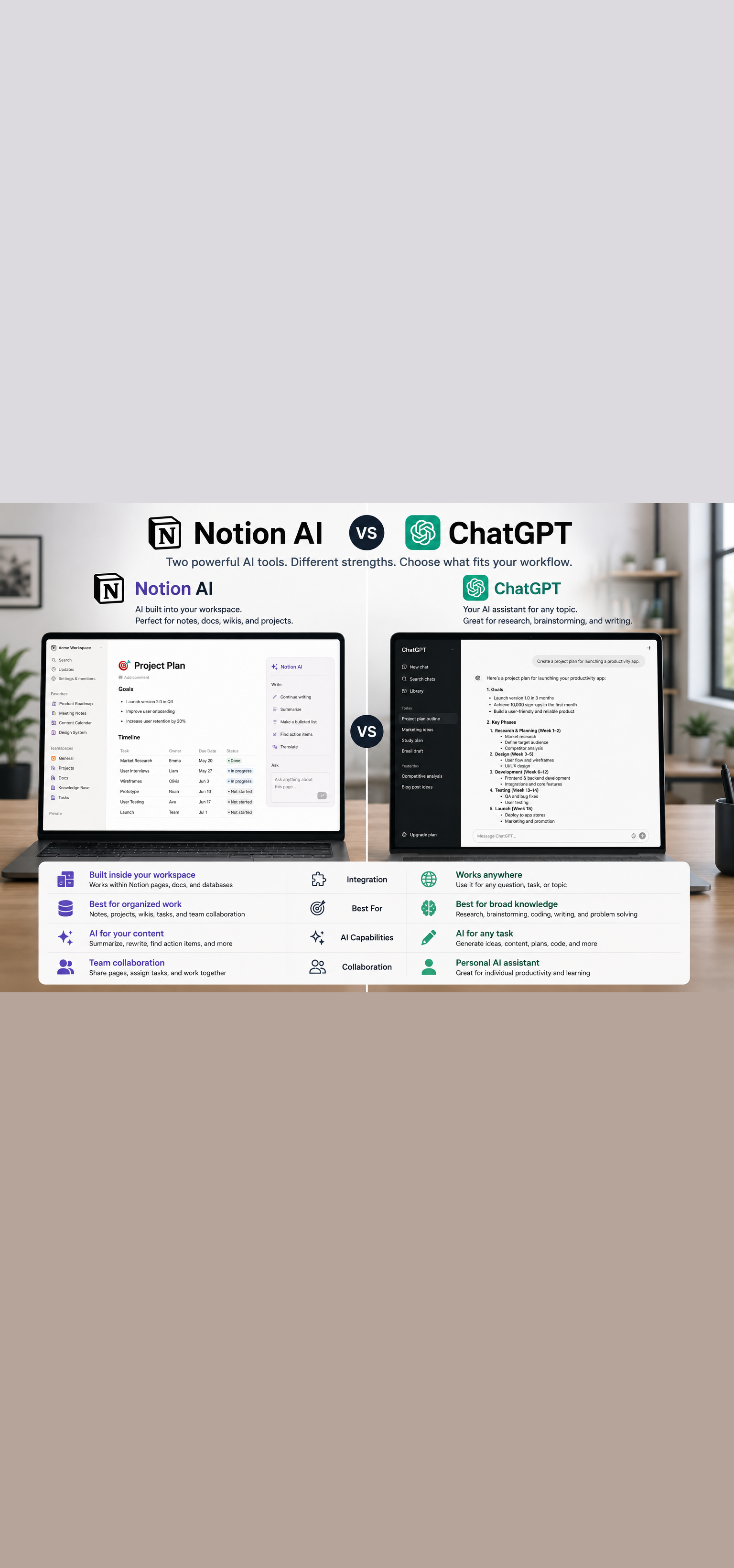
Notion AI is a workspace-integrated AI assistant. It is built to enhance the productivity environment you are already working in. Instead of switching to a separate tool, Notion AI lives inside your documents, databases, and project management systems and helps you work with the content that already exists there.
This distinction shapes everything that follows. ChatGPT is better when you need to generate something from scratch or solve a problem that exists primarily in your head. Notion AI is better when the work you need help with is already living in your Notion workspace.
Keeping this framing in mind will help you apply the comparison to your specific situation rather than treating it as an abstract evaluation.
Writing and Content Generation
ChatGPT
ChatGPT is one of the most powerful writing tools available for professionals who need to generate content quickly across diverse formats and contexts. It handles long-form articles, email drafts, social media copy, sales scripts, technical documentation, creative writing, and virtually any other text-based output with impressive fluency.
The conversational interface makes it easy to iterate. You generate a draft, provide feedback in natural language, and refine through multiple rounds of dialogue until the output matches your needs. This iterative process is where ChatGPT genuinely excels and where many users find it most valuable.
The quality of output is directly tied to the quality of your prompts. Professionals who invest time in developing strong prompting skills consistently get dramatically better results than those who use basic, unstructured prompts.
Verdict for writing: ChatGPT is the stronger tool for generating content from scratch, particularly for diverse formats, complex topics, and iterative refinement.
Notion AI
Notion AI's writing capabilities are integrated directly into your workspace. You can use it to draft content within a Notion page, expand bullet points into full paragraphs, improve the clarity and tone of existing writing, and generate summaries of long documents without leaving your workspace.
The key advantage is context. Notion AI can reference the content already in your page or database, making it useful for tasks like writing a project update that references your existing project notes, or generating a meeting agenda based on the topics logged in your workspace.
The limitation is depth. For complex, long-form content generation, Notion AI produces noticeably lower quality output than ChatGPT with GPT-4. It is a capable writing assistant for moderate tasks but not the tool you reach for when you need your best possible output.
Verdict for writing: Notion AI wins for in-workspace writing tasks where context from existing content matters. ChatGPT wins for high-quality, complex content generation from scratch.
Research and Information Analysis
ChatGPT
With web search enabled in ChatGPT Plus, the tool can research current topics, synthesize information from multiple sources, and provide comprehensive answers to complex questions. The conversational format allows you to drill down, ask follow-up questions, and explore adjacent topics in a single session.
ChatGPT with the Advanced Data Analysis feature can also analyze documents, spreadsheets, and data you upload, generating insights, summaries, and visualizations based on your specific files.
For professionals who need to research topics, analyze information, or synthesize insights from diverse sources, ChatGPT is a genuinely powerful tool that would have required hours of manual research to replicate a few years ago.
Verdict for research: ChatGPT is the stronger tool for open-ended research, information synthesis, and document analysis, particularly with web search and data analysis features enabled.
Notion AI
Notion AI's research capabilities are primarily limited to the content that already exists in your Notion workspace. It can summarize long documents, extract key points from meeting notes, and answer questions about the content in your pages and databases.
This is genuinely useful for teams that maintain extensive documentation in Notion, as it allows any team member to quickly surface information from the knowledge base without reading through every document manually. But it cannot access information outside your workspace, which limits its utility for open-ended research tasks.
Verdict for research: Notion AI wins specifically for surfacing and synthesizing information that already lives in your workspace. ChatGPT wins for everything else.
Task and Project Management
ChatGPT
ChatGPT has no native task management or project management functionality. You can use it to help plan projects, generate task lists, structure project timelines, and think through resource allocation, but it does not have a memory of your projects between sessions, cannot track task status, and does not integrate directly with your workflow.
You can copy the outputs into your project management tool, but the disconnect between ChatGPT and your actual work systems means there is always manual friction in the process.
Verdict for project management: ChatGPT is useful for planning and thinking, not for managing ongoing work.
Notion AI
This is where Notion AI has a fundamental structural advantage. Because it lives inside Notion, it has direct access to your tasks, projects, databases, and documentation. It can generate project plans that populate directly into your database, summarize the status of active projects based on your logged updates, create meeting agendas from your task list, and draft project documentation that references your existing workspace content.
For teams that use Notion as their project management and documentation hub, Notion AI feels genuinely integrated in a way that no external AI tool can replicate without significant manual transfer of information.
Verdict for project management: Notion AI wins clearly for anyone managing work inside a Notion workspace.
Meeting Notes and Documentation
ChatGPT
ChatGPT can help you draft meeting agendas, prepare discussion questions, structure meeting notes from a rough bullet list you provide, and generate follow-up email drafts based on meeting outcomes you describe. With a transcript pasted into the conversation, it can produce a clean summary with action items.
The limitation is that these tasks all require you to bring the content to ChatGPT. There is no automatic connection to your calendar, your meeting recordings, or your existing documentation.
Verdict for meetings: ChatGPT handles meeting-related writing tasks well when you bring the content to it. The manual transfer step is a consistent friction point.
Notion AI
Notion AI can generate meeting note templates, auto-fill action items from meeting notes you paste into a page, summarize meeting documentation stored in your workspace, and create follow-up tasks that populate directly into your project database.
When combined with an AI meeting recording tool like Fathom or Fireflies that exports transcripts directly to Notion, the workflow becomes highly streamlined. The transcript lands in Notion, Notion AI summarizes it, and the action items populate your task database without significant manual effort.
Verdict for meetings: Notion AI wins for teams with an established Notion-based documentation workflow. The integration advantage is significant.
Code Generation and Technical Tasks
ChatGPT
ChatGPT with GPT-4 is one of the most capable code generation and technical problem-solving tools available to non-developers and developers alike. It can write code in virtually any programming language, debug errors, explain technical concepts in plain language, review code for issues, and help non-technical professionals understand and work with technical systems.
The Advanced Data Analysis feature extends this to running Python code, analyzing datasets, and generating charts and visualizations based on data you upload.
For any technical task beyond basic text generation, ChatGPT is significantly more capable than Notion AI.
Verdict for technical tasks: ChatGPT wins by a wide margin.
Notion AI
Notion AI has limited technical capabilities. It can generate basic code snippets for simple tasks and help explain technical concepts in documentation, but it is not a tool designed for serious technical work. Developers and technically-oriented professionals will find it falls well short of their needs for anything beyond basic assistance.
Verdict for technical tasks: Notion AI is not competitive in this category.
Team Collaboration
ChatGPT
ChatGPT is primarily an individual tool. While ChatGPT Team and Enterprise plans offer some shared workspace features, the tool is fundamentally designed around individual conversations rather than collaborative team workflows. Sharing outputs requires copying and pasting into shared documents or communication tools.
Verdict for collaboration: ChatGPT is limited as a team collaboration tool in its current form.
Notion AI
Notion is built from the ground up as a collaborative workspace. Notion AI inherits this collaborative foundation entirely. When your team's documentation, projects, and knowledge base live in Notion, Notion AI's outputs are immediately accessible to the whole team within the environment where they already work.
Team members can use Notion AI to surface information from shared databases, generate content that builds on the team's existing documentation, and maintain consistency across team-generated content because the AI has access to the full shared context.
Verdict for collaboration: Notion AI wins clearly for team-based use cases.
Pricing Comparison
Understanding what each tool costs is essential for making a practical decision.
ChatGPT Pricing
The free tier of ChatGPT provides access to GPT-3.5 with limited capabilities. ChatGPT Plus costs $20 per month per user and provides access to GPT-4o, web search, image generation with DALL-E, and the Advanced Data Analysis feature. ChatGPT Team is priced at $25 per user per month billed annually and adds collaborative features and higher usage limits. Enterprise pricing is custom and includes enhanced security and compliance features.
For individual professionals who want access to the most capable features, ChatGPT Plus at $20 per month is the practical entry point.
Notion AI Pricing
Notion AI is available as an add-on to any Notion plan at $8 per member per month billed annually, or $10 per member per month billed monthly. This is in addition to the cost of the underlying Notion workspace plan, which starts at $8 per user per month for the Plus plan.
For a professional already on Notion Plus, adding Notion AI brings the total to approximately $16 per user per month billed annually, which is competitive with ChatGPT Plus for a tool that is embedded directly in your primary workspace.
Verdict on pricing: Both tools are competitively priced for their respective value propositions. If you are already a Notion user, Notion AI's pricing is particularly compelling given the integration value.
Strengths and Limitations Summary
ChatGPT Strengths
- Superior content generation quality across diverse formats
- Powerful research and information synthesis capabilities
- Strong technical and coding assistance
- Highly capable for complex reasoning and problem solving
- Broad versatility across virtually any task type
ChatGPT Limitations
- No integration with your existing work systems
- No persistent memory of your projects between sessions without custom setup
- Requires manual transfer of outputs into your workflow
- Not designed for team collaboration
Notion AI Strengths
- Deep integration with your existing Notion workspace and content
- Direct access to your team's documentation, projects, and databases
- No context-switching between tools
- Built for team collaboration
- Strong for summarization and in-workspace writing tasks
Notion AI Limitations
- Cannot access information outside your Notion workspace
- Writing and content generation quality is lower than ChatGPT for complex tasks
- Limited technical capabilities
- Less effective for open-ended research and complex reasoning
Which Tool Should You Choose
The answer depends almost entirely on how you work and where your work lives.
Choose ChatGPT if:
- You need high-quality content generation for diverse formats and complex topics
- You regularly conduct research or need to synthesize information from external sources
- You work on technical tasks including coding, data analysis, or system design
- You are an individual professional rather than part of a team using shared systems
- You want the most capable general-purpose AI tool available
Choose Notion AI if:
- You and your team already use Notion as your primary workspace
- Your most important productivity challenges involve working with content and information that already lives in Notion
- You want AI assistance without context-switching between tools
- Team collaboration and shared knowledge management are priorities
- You are looking for the most seamless integration with your existing workflow
Use both if:
- You need Notion AI for in-workspace productivity and team collaboration
- You need ChatGPT for high-quality content generation, research, and technical tasks
- Your budget supports both tools, which combined cost approximately $28 to $30 per month
The professionals getting the most value from AI tools in 2026 are frequently using both, treating them as complementary tools rather than direct competitors. Notion AI handles the workflow and collaboration layer. ChatGPT handles the heavy lifting on content, research, and complex problem solving.
Final Thoughts
Notion AI and ChatGPT are both excellent tools. The comparison is not about which one is objectively better. It is about which one is better for your specific situation, your specific workflow, and your specific team context.
If you have been using one and wondering whether the other would serve you better, the answer is probably not either or. It is likely both, used intentionally for the tasks each one handles best.
The professionals winning with AI tools are not the ones who found the single perfect tool. They are the ones who built a stack of complementary tools and learned to use each one where it delivers the most value.
Start with the tool that addresses your most pressing productivity gap. Add the other when the need becomes clear.
Your workflow deserves the best of both.
Want more insights like this? Subscribe to the AI Success Forum newsletter.