How to Build a Second Brain Using AI
How to Build a Second Brain Using AI
Your brain is not designed for storage. It is designed for thinking. Yet most professionals spend enormous mental energy trying to remember — where they saved that article, what was said in last month's meeting, which project had that insight they want to use again, what they read six months ago that is suddenly relevant today.
The cognitive overhead of trying to hold everything in your head is one of the most significant hidden drains on professional performance. It creates mental clutter, slows decision-making, and means that valuable knowledge you have already acquired gets lost and rediscovered repeatedly instead of building into something cumulative.
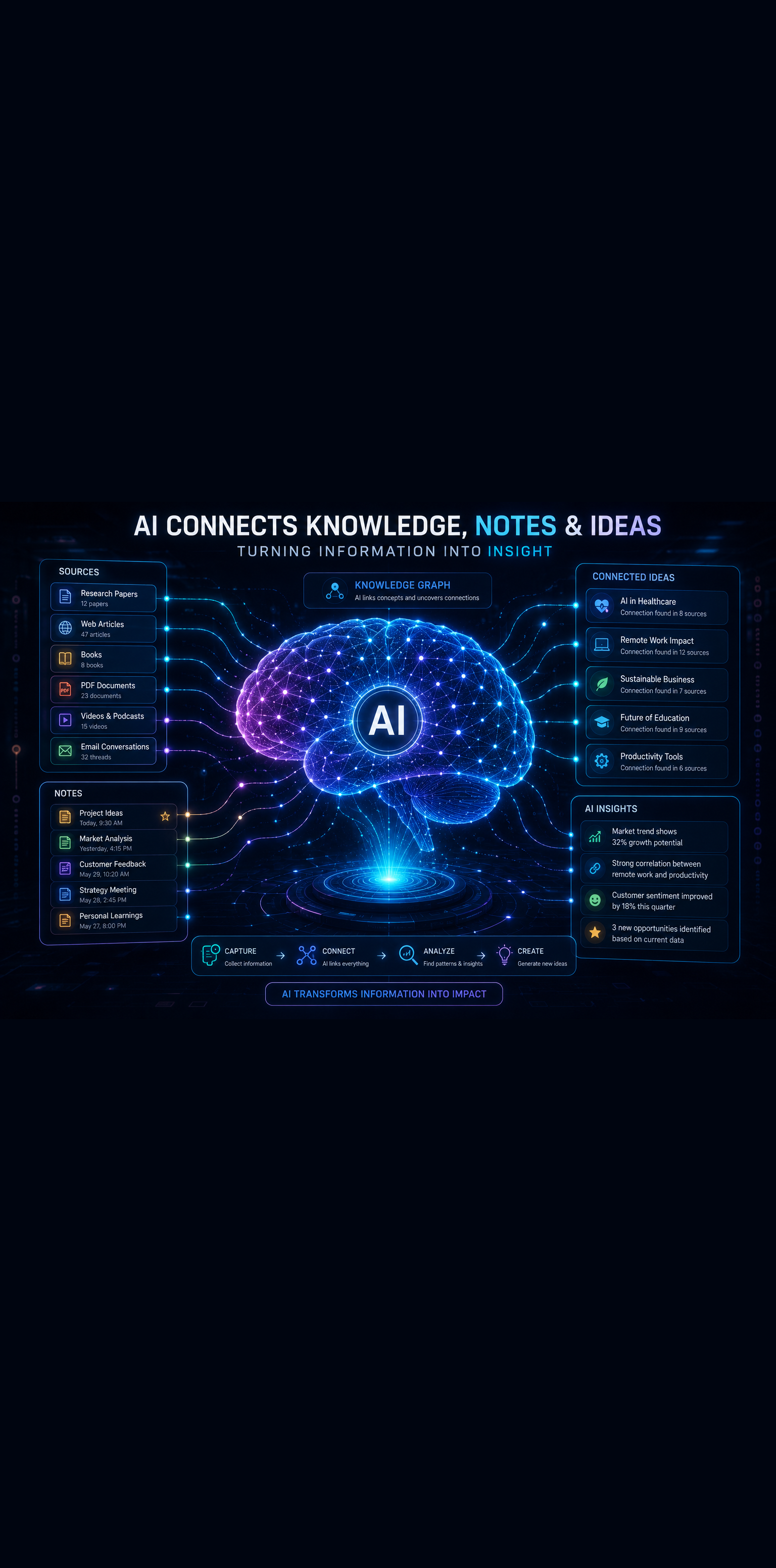
Building a second brain using AI solves this problem at the root. A second brain is an external system — powered by the right tools and habits — that captures everything worth keeping, organizes it intelligently, surfaces what is relevant when you need it, and connects ideas across time and context in ways your biological memory cannot.
AI makes this system dramatically more powerful and sustainable than previous note-taking and knowledge management approaches. This guide gives you everything you need to build yours.
What a Second Brain Actually Is
The concept of a second brain was popularized by productivity expert Tiago Forte, whose core insight is that creative and intellectual professionals need an external system to capture and organize the knowledge flowing through their lives — not just tasks and calendar events, but ideas, insights, research, and resources.
Without such a system, knowledge arrives, gets used briefly if at all, and then disappears. Articles are read and forgotten. Meeting insights are captured in notebooks that never get reviewed. Research done for one project cannot be retrieved when it becomes relevant to another.
A second brain changes this by creating a trusted external system where captured knowledge compounds over time. Every insight you record, every article you save, every idea you develop adds to a growing body of knowledge that you can draw on forever.
AI adds three transformative capabilities to this concept that previous note-taking tools could not provide: intelligent organization without manual effort, powerful search that finds what you need even when you do not remember the exact words you used, and synthesis that connects ideas across your knowledge base in ways that surface new insights.
The Four Core Functions of an AI-Powered Second Brain
Before choosing tools or building systems, understand the four functions your second brain needs to perform. Every tool and habit you build should serve one of these functions.
Capture
Your second brain is only as valuable as what goes into it. Capture is the habit of quickly saving anything worth keeping — without friction, without extensive processing, without perfectionism.
The goal is to lower the barrier to capture so low that nothing valuable slips through. A five-second voice note, a quick highlight on an article, a screenshot of a whiteboard, a one-line idea captured mid-conversation — all of these feed your system. Processing and organizing comes later. First, everything worth keeping gets captured.
Organize
Raw captured information is not useful until it is organized in a way that makes retrieval possible. The best second brain systems organize not by topic category but by actionability — what project does this support, what area of your life or work does it relate to, what might I actually use this for?
AI dramatically improves the organization layer by handling much of the categorization, tagging, and linking work that previously required manual effort. Modern AI-powered knowledge tools can read a captured note and suggest relevant categories, link it to related content, and surface it when future notes touch on the same themes.
Distill
Not everything you capture is equally valuable, and the full text of every article you save is not what you want to retrieve later. Distillation is the process of extracting and highlighting the most important ideas from captured content so that future retrieval gives you concentrated insight rather than raw material.
AI is exceptionally well-suited to distillation. It can summarize a 3,000-word article into five key takeaways, extract the most relevant quotes from a research paper, or identify the core insight from a meeting transcript. This transforms your second brain from an archive into a library of already-processed ideas.
Express
A second brain that only receives information and never outputs it is an archive, not a thinking system. Expression is the function of using your accumulated knowledge to produce new thinking — writing, presentations, decisions, strategies, creative work.
AI accelerates expression by helping you retrieve relevant knowledge on demand, connect ideas across your knowledge base, and turn captured insights into polished outputs faster than working from memory alone.
Step 1: Choose Your Core Knowledge Management Platform
Your second brain needs a home — a central platform where your organized knowledge lives and that you trust enough to make the habit of capturing stick. Several strong options exist in 2026, each with different strengths.
Notion with Notion AI
Notion has become the platform of choice for second brain systems because of its flexibility, its combination of structured databases and free-form notes, and Notion AI's deep integration throughout the workspace.
Notion AI can summarize pages, answer questions about your saved content, help you find connections across notes, draft new content drawing on your existing knowledge, and fill database properties automatically based on note content. For a second brain that needs both structure and flexibility, Notion is the strongest all-around option.
Build your Notion second brain around four core databases: a notes database for individual ideas and insights, a projects database for active work, a resources database for saved articles and references, and an areas database for ongoing responsibilities. Connect these through Notion's relation and rollup features and you have a linked knowledge system rather than isolated folders.
Obsidian with AI Plugins
Obsidian is the preferred choice for professionals who prioritize deep linking between ideas and local storage of their knowledge base. Its core philosophy is the knowledge graph — a visual network of connections between notes that reveals relationships your linear folder structure would never surface.
Obsidian's AI plugin ecosystem, including integrations with ChatGPT and Claude, adds AI summarization, question-answering across your vault, and automated linking suggestions. The local-first storage model appeals to professionals with strong data privacy concerns, since your knowledge base never touches external servers unless you choose to sync it.
The trade-off is a steeper setup curve than Notion. Obsidian rewards investment — the more you use it and the more connections you build, the more powerful it becomes.
Mem.ai
Mem is designed specifically as an AI-native second brain. Unlike Notion or Obsidian which were built as note-taking tools and added AI, Mem was built from the ground up around AI-powered organization and retrieval.
Mem's core capability is automatic organization — you capture notes freely without any manual tagging or filing and Mem's AI organizes them intelligently based on content, surfacing relevant notes when you create new ones and answering questions about your knowledge base in natural language.
For professionals who want maximum capture speed with minimal organizational overhead, Mem offers the lowest friction second brain experience available.
Apple Notes or Google Keep with ChatGPT Integration
For those who prefer simplicity over sophistication, a basic notes app for capture combined with ChatGPT or Claude for processing and synthesis is a viable lightweight second brain setup. Capture everything in Apple Notes or Google Keep, then periodically process highlights and key notes into a more structured system with AI assistance.
This approach is better than no system at all and can evolve into a more sophisticated setup as your habits solidify.
Step 2: Build Your Capture Habits
The most sophisticated knowledge management system fails if nothing gets captured. Capture habits are the foundation everything else depends on.
The Quick Capture Rule
Establish one frictionless capture method you will use for everything — a single inbox where ideas, insights, articles, and references land before being processed. The simpler and faster this capture method is, the more you will actually use it.
Options that work well for most people include a dedicated inbox note in your chosen platform, a voice memo app for capturing ideas while moving, a browser extension for saving articles with highlights, and a simple keyboard shortcut for capturing directly from any app on your computer.
The key is having exactly one capture destination, not several. Multiple capture points create the anxiety of not knowing where things are and reduce your confidence in the system.
What Is Worth Capturing
Not everything deserves space in your second brain. Apply a simple filter: does this idea, insight, or resource have potential future value beyond its immediate context? If yes, capture it. If no, let it go.
Specifically worth capturing:
- Insights from articles, books, or podcasts that could apply to future work
- Ideas that arrive during meetings, walks, or conversations
- Research relevant to active projects or ongoing interests
- Templates, frameworks, and mental models you want to apply again
- Feedback, decisions, and lessons from your own experience
- Quotes and examples that crystallize important ideas
Not worth capturing: routine task reminders, temporary reference information, content you will never realistically need again.
Use AI to Lower Capture Friction Further
Several AI-powered capture tools reduce the friction of getting information into your second brain even further.
Readwise automatically syncs highlights from Kindle books, Instapaper, Pocket, and other reading apps into your knowledge management platform. If you highlight while you read, Readwise handles the transfer automatically.
Otter.ai or Fireflies.ai transcribe and summarize meetings automatically, turning spoken conversations into searchable text that can flow into your knowledge base without manual note-taking.
Browser extensions for Notion, Obsidian, or Mem allow you to save articles, highlight key passages, and add brief notes in seconds without leaving your browser.
Step 3: Organize with AI Assistance
Once your capture habit is established, you need a lightweight organization process that keeps your second brain navigable without requiring hours of manual filing.
The PARA Framework
Tiago Forte's PARA framework is the most widely used organizational structure for second brains and works exceptionally well with AI-powered tools.
PARA organizes everything across four categories:
- Projects — Active work with a defined outcome and deadline
- Areas — Ongoing responsibilities without a defined end date (health, finances, professional development)
- Resources — Reference material you might use in the future
- Archive — Inactive items from the other three categories
This structure organizes by relevance to your current life and work rather than by topic, which means the most actionable material is always in view and completed or inactive material moves to archive rather than cluttering your active workspace.
Let AI Handle Tagging and Linking
Manual tagging and folder filing is where most second brain systems break down. It requires consistent discipline, and most people abandon it when life gets busy.
Use AI to handle the organizational overhead. In Notion, use AI to automatically suggest tags and database properties for new notes. In Obsidian, use the Smart Connections plugin to surface relevant existing notes when you create new ones. In Mem, let the AI organize automatically without manual input.
Your role is capture and review. Let AI handle the metadata.
Build a Weekly Review Habit
A second brain without regular review becomes an archive rather than an active thinking system. Schedule a 20 to 30 minute weekly review where you:
- Process your capture inbox into the appropriate PARA categories
- Review notes from the current week and distill key insights
- Check active project notes and update progress
- Surface anything from your resources or archive that is relevant to current work
Use AI to accelerate this review. Ask ChatGPT or your platform's AI to summarize your week's captures, identify patterns across recent notes, and suggest connections to older material you might have forgotten.
Step 4: Distill Your Knowledge with AI
Raw captured content is not useful on its own. Distillation turns your saved material into concentrated, retrievable insights.
Progressive Summarization
Progressive summarization is Forte's technique for making notes increasingly useful without requiring extensive upfront processing. When you first capture a note, you save the full content. On first review, you highlight the most important passages. On second review, you bold the most essential highlights. Over time, a note becomes a concentrated extract of its most valuable insights.
AI accelerates this process dramatically. Paste a saved article into Claude or ChatGPT and ask for a five-point summary of the most actionable insights. Ask it to extract the single most important idea. Ask it to connect the content to a specific project you are working on.
What would take 20 minutes of careful manual reading and annotation takes two minutes with AI distillation.
Build a Personal Knowledge Base of Permanent Notes
Beyond capturing and distilling external content, the most valuable notes in your second brain are your own permanent notes — your developed thinking on topics that matter to you.
A permanent note is not a summary of someone else's idea. It is your own formulated understanding, written in your own words, connected to other ideas in your system. These notes compound over time because each new permanent note you write draws on and extends your existing thinking.
Use AI to help you develop permanent notes from your captures. Ask ChatGPT or Claude: "Based on these highlights from [article/book/meeting], help me write a permanent note that synthesizes the key idea in my own words and connects it to [related concept I already understand]."
This process builds genuine knowledge rather than just storing other people's ideas.
Step 5: Express and Apply Your Knowledge
A second brain that never generates output is a sophisticated filing system, not a thinking tool. The expression function is what makes your accumulated knowledge productive.
Use AI to Connect Ideas Across Your Knowledge Base
One of the most powerful applications of an AI-powered second brain is asking it to find connections you would never discover manually. When starting a new project or tackling a complex problem, ask your knowledge management AI or ChatGPT with your notes as context:
"I am working on [project or problem]. Based on what I have captured in my knowledge base, what relevant ideas, frameworks, or resources should I consider?"
This retrieval capability turns your second brain from passive storage into an active thinking partner.
Accelerate Writing and Presentations with Your Own Knowledge
When you need to write an article, prepare a presentation, or develop a proposal, your second brain should be the first place you look. Your accumulated insights, research, and developed thinking are far more valuable raw material than starting from scratch or relying on generic AI output.
Share relevant notes with ChatGPT or Claude and ask it to help you synthesize them into a structured outline, a first draft, or a set of key talking points. The output draws on your own knowledge rather than generic AI training data, making it genuinely unique to your perspective and experience.
Review and Apply Systematically
Beyond reactive retrieval, build scheduled application sessions into your workflow. Monthly, review your resources and permanent notes related to your most important current projects. Ask: what have I captured that I have not yet applied? What insight from three months ago is now relevant to a current challenge?
This deliberate review turns your second brain into a source of ongoing competitive advantage rather than just a reference library you consult occasionally.
The Essential AI Tools for Your Second Brain
A practical toolkit for an AI-powered second brain does not need to be complex. Here are the tools worth considering at each layer:
Core Platform: Notion with Notion AI, Obsidian with AI plugins, or Mem.ai depending on your preferences for structure, linking depth, and organizational automation.
Capture Tools: Readwise for reading highlights, Otter.ai or Fireflies.ai for meeting transcription, and a mobile app for quick voice and text capture on the go.
AI Processing: ChatGPT Plus or Claude Pro for summarization, distillation, synthesis, and drafting from your knowledge base.
Automation: Zapier or Make to connect your capture tools to your core platform automatically, reducing manual transfer work.
Start with the core platform and one capture tool. Add additional layers as your habits solidify and you understand where the friction in your specific system lies.
Common Second Brain Mistakes to Avoid
Even well-intentioned knowledge management systems fail when these patterns appear.
Capturing without reviewing. A second brain that receives information but never processes it becomes an anxiety-producing archive you avoid rather than a trusted system you rely on. The weekly review habit is non-negotiable.
Over-organizing before capturing. Spending more time building the perfect folder structure than actually capturing knowledge is a common procrastination pattern. Start simple, capture generously, and refine organization based on what you actually need to find.
Using too many tools. Every additional capture destination reduces trust in your system. One primary platform, one primary capture method, and a small number of integrations is all you need.
Treating it like a filing system rather than a thinking system. Your second brain should be a place where thinking happens, not just where information gets stored. Write your own notes. Develop your own permanent notes. Use it to generate output, not just store input.
Conclusion: Build the System That Makes You Smarter Over Time
Building a second brain using AI is one of the highest-leverage investments a knowledge worker can make. Unlike skills that depreciate, a well-maintained second brain appreciates — every insight captured, every connection made, every permanent note developed adds to a compounding body of organized knowledge that makes every future project easier, every decision better-informed, and every creative output richer.
The system does not need to be perfect to start working. It needs to be trusted, which means it needs to be simple enough that you actually use it and consistent enough that you can always find what you put in.
Start with one platform. Build one capture habit. Do one weekly review. Let AI handle the organizational overhead that makes most systems collapse.
Your best thinking is already happening. A second brain makes sure none of it gets lost.
Want more insights like this? Subscribe to the AI Success Forum newsletter.